

Toolkit #4: Visual Communications
How to create professional-looking materials that get your message across
How to take better event photos
What's in this toolkit?
Good visuals help your message stick. Whether you're creating posters for your repair café, social media posts about your latest swap, or a simple flyer for the community board, you can use existing tools and resources to create professional-looking materials.
You don't need design experience or expensive software. By knowing where to find the right templates, photos and icons, you can create materials that look great and get your message across clearly.
Plan your shots before the event
Running an event takes a lot of work, meaning photography can sometimes be an after thought. By doing a little pre-planning beforehand you can
Think about your story: What do you want people to see? The activity, the people, the results?
Identify key moments: Arrivals, busy activity, successful repairs/swaps, happy faces, before/after shots.
Know your lighting: Natural light from windows beats overhead lights every time. Plan where to position activities if possible.
Shoot at the right level: Crouch down for children, stand on a chair for overview shots. Get close for action shots i.e. hands fixing or making things.
Capture the right moments
-
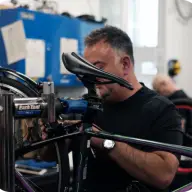
Action Shots
Close-ups of hands working
People collaborating on problems
Before/after of repaired items
Moment of success when something works
-
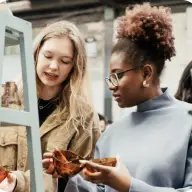
People Connecting
Genuine conversations (as opposed to staged)
Volunteers helping participants
Shared laughter or satisfaction
Intergenerational skill sharing
-
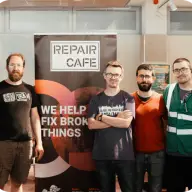
Overview shots
Busy rooms showing participation
Tables full of shared items
Queues of people engaged
Your space set up and ready
Simple techniques for better phone photos
- Get closer:
- Most photos improve when you take two steps closer to your subject. You can also crop into your images afterwards on your phone or computer.
- Take lots of shots:
- People move, blink, look away. Take 5-6 photos of each moment.
- Hold your phone steady:
- Use both hands, breathe out as you press the shutter.
- Clean your lens:
- Might sound obvious but it makes a big difference. Wipe it with your shirt - you'll be amazed at the difference.
Handle permissions and privacy properly
- Always ask before photographing people
- Especially children. Most people are happy to help, but they appreciate being asked.
- Focus on activities over faces
- If you're unsure about permissions or want to use photos widely.
- Create a simple consent process
- A clipboard with a sign-up sheet works perfectly for events.
- Remember privacy concerns
- Not everyone wants to be on social media, even for good causes. Respect this.